I have been running Client Solutions since October and have found it is now a full replacement for Iseries Access and Ops Navigator. The last update added the last missing piece, Run SQL scripts.
For the most part I use Linoma's Surveyor/400 software which is awesome and I really miss it when I have to work on machine it is not licensed on. That's where Client Solutions comes to play, and play well, it now does.
I have to say even over remote VPN client it all works very well. I am starting to use Navigator i for all monitoring replacing green screen.
One gotcha to be aware of. I went to delete 125mb save file from IFS folder and the machine ground to a halt. Not a good thing in the middle of the day. Had to sweat it out for 20 minutes before the machine would respond.
I knew there was a December update that I had not loaded so I downloaded and installed. Install was painless and now have run SQL option.
Planning to wait until off hours on Sunday to try deleting from IFS and see if issue was resolved in last update.
Have a great day!
~Richard
IBM iSeries hardware, software and other day to day technical challenges. I am a problem solver and business analyst providing solutions to companies and assisting my peers.
Showing posts with label iSeries Navigator. Show all posts
Friday, January 29, 2016
IBM i Access Client Solutions, AWESOME!
Labels:
Access Solutions,
AS400,
IBMi,
iSeries Navigator
Thursday, February 14, 2013
Clean iSeries output queue by days to keep
It’s has been a fast six months, new job has kept me hopping. One day I’m redesigning the EDI guidelines and RPGLE programming interfaces to the next day chasing Purchase order suggestions. Tape backup failing without notification to GL year end posting to rewriting code replacing OPNQRYF with embedded SQL. Point of Sale hiccups to AP check failure to working with eCommerce. Every single modification that the previous software vendor implemented has a problem one way or the other.
Basically I have not been happier than any other point in my career!
I ran across the need to automate purging old spool file records and could not find any code close enough to cut, paste, compile, run and free. In the past have used TAATOOL but is not currently an option.
My good buddy Rick Santiago has a purge out queue by date program that he wrote a while back. Short and sweet I quickly envision modifying for my needs.
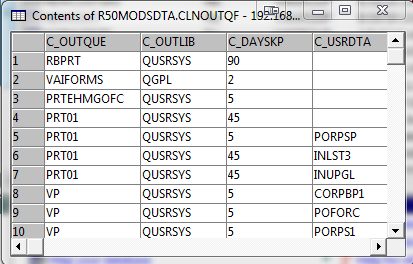
Through iSeries navigator I created a table with four fields, out queue name, out queue library, number of days to keep spool file entries and user data.

I also added the following key constraints, C_OUTQUE, C_OUTLIB and C_USRDTA as unique.
Follow your nose and instructions in the comments of the CL and you’ll have a quick little program you can add to your nightly process.
Hopefully this help some other poor one man band quickly solve a minor annoyance programmatically.
CLNOUTQ is the driver and CLNOUTQ2 exists due to only being able to use one RCVF in a CL in a read loop and detect end of file.
CLNOUTQ
CLNOUTQ2
And you'll seek but never find,
But blaze your own path
And the road to success
Will trail right behind.
~Robert Brault, www.robertbrault.com
Basically I have not been happier than any other point in my career!
I ran across the need to automate purging old spool file records and could not find any code close enough to cut, paste, compile, run and free. In the past have used TAATOOL but is not currently an option.
My good buddy Rick Santiago has a purge out queue by date program that he wrote a while back. Short and sweet I quickly envision modifying for my needs.
Through iSeries navigator I created a table with four fields, out queue name, out queue library, number of days to keep spool file entries and user data.
I also added the following key constraints, C_OUTQUE, C_OUTLIB and C_USRDTA as unique.
Follow your nose and instructions in the comments of the CL and you’ll have a quick little program you can add to your nightly process.
Hopefully this help some other poor one man band quickly solve a minor annoyance programmatically.
CLNOUTQ is the driver and CLNOUTQ2 exists due to only being able to use one RCVF in a CL in a read loop and detect end of file.
CLNOUTQ
CLNOUTQ2
~Richard
Try to discover
The road to successAnd you'll seek but never find,
But blaze your own path
And the road to success
Will trail right behind.
~Robert Brault, www.robertbrault.com
Labels:
AS400,
IBM,
iSeries Navigator,
OUTQUE,
Spool File
Sunday, July 29, 2012
iSeries SQL Function Proper Case.....
One of my clients asked me to update the tax processing currently working in VAI System 2000 on the iSeries. The requirement is set up the county tax file and update the customer master with the proper county code based on the city field in the customer master.
Challenges abound, the city field in the customer file is mixed with all capitals, all lower case, proper case and misspellings. And yes, I have to learn how to fill out Florida sales tax form, which is where we find a $5000.00 limit on county tax. Always a twist somewhere.
First I looked for availability of current taxes for the State of Florida with city, county and current tax. I found Tax-Rates.org and for 39.00 bucks with the information needed, I downloaded CSV, changed to Excel and uploaded to the iSeries using Data Transfer To IBM i. This enables me to create the file on the IBM i automatically during the upload.
Once I have the file on the IBM i I have to overcome the case problem with the RMCITY field. There should be a way to do this without any code. I can do it in RPGLE using embedded SQL no problem but know there must be a way with just an SQL UPDATE statement.
Well, sort of correct, SQL does not have a PROPER function but I found this code about Functions with downloadable code, cool. First brush up on Control Statements and Create Function article by Scott Klement. It did not take me to long to figure out. I was tripped up on the definition of the inbound field but soon realized @TCSTRING VARCHAR(100) is the data field being returned.
I opened System i Navigator and expanded Databases so I can see Functions.

Right click and select New - SQL and the following is displayed -
Change the following -
Function = PROPER,
Description = Change Case To Proper
Type = VARCHAR,
Length = 100
Check = Same result returned from …....(Deteministic)
Data access = Modifies SQL data
Specific name = PROPER

Select the Parameters tab and then Insert, the following is displayed -

Change the Parameter Name to @TCSTRING, change Type to VARCHAR, Length to 100 and check of Return Null on Null input.

I downloaded the code and opened in notepad. Copied from BEGIN to END. I left out the SQL parameters since we are selecting them in the wizard. There are easier ways to just create the Function from the copied code, but the wizard breaks it out and explains it a little better.

Click on OK and the Wizard closes and the following should be displayed.

Now we can generate the SQL, right click on PROPER and select Generate.
If I need to change a field to be consistent like the city field in customer master I just run the following SQL statement.
update transfer.VARCUST
set rmcity = qgpl.proper(rmcity)
Several things to figure out, why library where the function is located in has to be specified, I thought it would come from the library list. And I did not take to the time to understand all the checkboxes in the wizard. The function performed as I needed and enabled me to continue on with my project.
I finished identifying the missing city county combinations and update the list.
The following SQL updated the county code field in the customer master based on the cross reference FL_CTYTXa file. There is a little problem with the SQL and I am looking for how it should be done correctly but what I created worked and updated the field as desired.
update transfer.varcust set rmcnty =
(select rkcnty
from transfer.VARCNTY, transfer.FL_CTYTXa
where city = rmcity
and salestaxregion = rkdesc
and rmstat = 'FL'
)
where exists
(select *
from transfer.VARCNTY, transfer.FL_CTYTXa
where city = rmcity
and salestaxregion = rkdesc
and rmstat = 'FL'
)
Previously I update the VARCNTY county tax file with the Florida taxes.
Now on to identifying where to put the hook in tax processing to only charge county tax on the first $5000.00 and testing.
Any suggestions or questions, please send them on.
~Richard
Talk doesn't cook rice. ~Chinese Proverb
Challenges abound, the city field in the customer file is mixed with all capitals, all lower case, proper case and misspellings. And yes, I have to learn how to fill out Florida sales tax form, which is where we find a $5000.00 limit on county tax. Always a twist somewhere.
First I looked for availability of current taxes for the State of Florida with city, county and current tax. I found Tax-Rates.org and for 39.00 bucks with the information needed, I downloaded CSV, changed to Excel and uploaded to the iSeries using Data Transfer To IBM i. This enables me to create the file on the IBM i automatically during the upload.
Once I have the file on the IBM i I have to overcome the case problem with the RMCITY field. There should be a way to do this without any code. I can do it in RPGLE using embedded SQL no problem but know there must be a way with just an SQL UPDATE statement.
Well, sort of correct, SQL does not have a PROPER function but I found this code about Functions with downloadable code, cool. First brush up on Control Statements and Create Function article by Scott Klement. It did not take me to long to figure out. I was tripped up on the definition of the inbound field but soon realized @TCSTRING VARCHAR(100) is the data field being returned.
I opened System i Navigator and expanded Databases so I can see Functions.
Right click and select New - SQL and the following is displayed -
Change the following -
Function = PROPER,
Description = Change Case To Proper
Type = VARCHAR,
Length = 100
Check = Same result returned from …....(Deteministic)
Data access = Modifies SQL data
Specific name = PROPER
Select the Parameters tab and then Insert, the following is displayed -
Change the Parameter Name to @TCSTRING, change Type to VARCHAR, Length to 100 and check of Return Null on Null input.
I downloaded the code and opened in notepad. Copied from BEGIN to END. I left out the SQL parameters since we are selecting them in the wizard. There are easier ways to just create the Function from the copied code, but the wizard breaks it out and explains it a little better.
Click on OK and the Wizard closes and the following should be displayed.
Now we can generate the SQL, right click on PROPER and select Generate.
If I need to change a field to be consistent like the city field in customer master I just run the following SQL statement.
update transfer.VARCUST
set rmcity = qgpl.proper(rmcity)
Several things to figure out, why library where the function is located in has to be specified, I thought it would come from the library list. And I did not take to the time to understand all the checkboxes in the wizard. The function performed as I needed and enabled me to continue on with my project.
I finished identifying the missing city county combinations and update the list.
The following SQL updated the county code field in the customer master based on the cross reference FL_CTYTXa file. There is a little problem with the SQL and I am looking for how it should be done correctly but what I created worked and updated the field as desired.
update transfer.varcust set rmcnty =
(select rkcnty
from transfer.VARCNTY, transfer.FL_CTYTXa
where city = rmcity
and salestaxregion = rkdesc
and rmstat = 'FL'
)
where exists
(select *
from transfer.VARCNTY, transfer.FL_CTYTXa
where city = rmcity
and salestaxregion = rkdesc
and rmstat = 'FL'
)
Previously I update the VARCNTY county tax file with the Florida taxes.
Now on to identifying where to put the hook in tax processing to only charge county tax on the first $5000.00 and testing.
Any suggestions or questions, please send them on.
~Richard
Talk doesn't cook rice. ~Chinese Proverb
Labels:
AS400,
IBM,
iSeries Navigator,
SQL,
SQL Explorer,
System 2000,
VAI
Subscribe to:
Posts (Atom)